
You picked AroFlo for compliance forms, supplier catalogues and stock. Most days your team quotes, books jobs and sends invoices. Watch the independent reviews on YouTube and you’ll hear the same thing: it’s built for a crew with an office behind it, and it takes time to set up properly. That might be why smaller teams are comparing aroflo alternatives.
For each option below, I’ve noted who it suits, what it costs as you grow, and how long it takes to get running.
TL;DR for aroflo alternatives: The seven options worth comparing are Clevero, Simpro, ServiceM8, Fergus, Tradify, NextMinute and Ascora. Clevero suits service businesses that need jobs, CRM and compliance records in one system they can change themselves, with native Xero and MYOB. ServiceM8, Fergus, Tradify, NextMinute and Ascora publish prices; Simpro and Clevero quote. AroFlo is still a fair choice for a trade team of three or more that uses its compliance, inventory and supplier tools every day.
7 Best AroFlo Alternatives at a Glance
Here is a quick comparison of the best aroflo alternatives for those who are short on time:
| Tool | Best for | Xero / MYOB | How it prices | Pricing (Nov 2026) |
| Clevero | Service businesses that need jobs, CRM and compliance in one system they can change | Both, native | Based on what you use | Quote only |
| Simpro | Larger, multi-division trade businesses | Both | Tailored to team size and add-ons | Quote only, plus a setup fee |
| ServiceM8 | Sole traders and small crews | Both | By job volume, unlimited users on paid plans | Free for 1 user and 30 jobs a month, then from A$29 a month incl. GST |
| Fergus | Trades focused on job costing and margins | Both | Plan, plus timesheet users | From A$53 a month |
| Tradify | Small trade teams that want a simple app | Both | Per user | From A$48 per user a month, ex GST |
| NextMinute | Residential builders and staged jobs | Xero | Flat fee for up to 5 users | A$299 a month ex GST for 5 users, then A$30 per extra user |
| Ascora | Growing service teams that want leads, inventory and payroll sync | Both | Per user | From A$45 per user a month |
For comparison, AroFlo itself starts at A$80 per user a month with a minimum of three users, and the rate drops as you add users.
Quick pick:
- If you’re a sole trader or a crew of two → look at ServiceM8 or Tradify.
- If your main problem is knowing which jobs make money → look at Fergus.
- If you’ve grown past AroFlo into multi-division work → look at Simpro.
- If you run more than one service line, or need CRM and compliance records next to your jobs → look at Clevero.
My first pick among these aroflo alternatives is Clevero, because your own team can change workflows as the business changes, and Xero and MYOB are built in. If you just need a lighter job app for a small crew, ServiceM8 will get you there faster.

Why trade businesses look for AroFlo alternatives
AroFlo is an Australian platform with a lot of depth. On the Xero App Store it rates 3.9 from 17 reviews, and reviewers praise the Xero integration and the help AroFlo’s team gives with training and setup. The reasons people look elsewhere are mostly about fit:
- The starting cost. AroFlo’s pricing page starts at A$80 per user a month with a minimum of three users, so a two-person business pays for a seat it doesn’t use.
- Add-ons on top. GPS Tracking and the AI Bill Scanner are listed as extras, not part of every plan.
- Setup time. Independent reviews from 2026 say to expect a learning curve and to take time setting it up, and one describes it as built for businesses with an office and a crew rather than sole traders.
- Support follow-up. An older Xero App Store review (January 2023) mentions slow follow-up on bug-fix requests. Ask any vendor how support works before you sign.
The 7 Best AroFlo Alternatives in Australia
1. Clevero
Best for: service businesses that need jobs, CRM and compliance records in one system their team can change.
Price: quote only, based on what you use (checked in November 2026).
Watch out for: setup takes more thought than a sign-up-and-go trade app, and if you rely on supplier catalogues, inventory or the mobile app, check those in a demo.
Clevero is an Australian business management platform for service businesses. Scheduling, jobs, CRM, digital forms, e-signatures, workflow automation and invoicing sit in one system, so your client history, job records and compliance forms are in the same place.
The biggest difference is who makes changes. Adding a job status, an approval step or a new form is point-and-click, and our team sets it up with you. If you run more than one service line, say installs, maintenance contracts and projects, each one can have its own workflow in the same platform.
As an AroFlo alternative, Clevero also keeps the records around the job. Native Xero and MYOB integrations send invoices and payments to your books without re-keying, and the audit trail builds as your team works, so you can see who changed a job, a form or an invoice and when. If you’re moving across, our data migration team helps bring your records over.
Pros
- Workflows, fields and forms you change yourself, point-and-click
- Jobs, CRM, forms and invoicing in one platform
- More than one service line in the same system
- Native Xero and MYOB integrations
- Audit trail built as your team works
Cons
- No public price list; you get a quote
- Broader than a trade app, so setup takes longer
Pricing: quote only, based on what you use.
2. Simpro
Best for: larger trade businesses running multi-division, multi-stage and maintenance work.
Price: quote only, plus a setup fee that covers onboarding, training and data migration (checked in November 2026).
Watch out for: ask about the contract term and the setup fee before you sign.
Simpro was founded in Brisbane and is built for bigger trade and service businesses. It covers quoting, job costing, scheduling, maintenance, inventory and reporting, with add-ons for more specialised work. Pricing is tailored to your team size and the add-ons you choose.
If your problem with AroFlo is that you’ve outgrown it, Simpro is the step up. I’ve compared its own competitors in my Simpro alternatives guide, and the two big Australian names side by side in Simpro vs ServiceM8.
AroFlo vs Simpro
AroFlo and Simpro are both part of the Simpro Group, so moving from one to the other keeps you with the same company. They still run as separate products. Comparisons from 2026 put AroFlo ahead on Australian trade fit, configurable field forms and supplier-driven inventory, and Simpro ahead on multi-division work and complex operations. AroFlo publishes a starting price; Simpro quotes. If you’re weighing aroflo vs simpro, run the same messy job through both demos.
Pros
- Depth for multi-stage projects and maintenance
- Job costing, inventory and reporting
- Australian company
Cons
- No public price, and a setup fee
- More system than a small crew needs
Pricing: quote only, plus a setup fee.
3. ServiceM8
Best for: sole traders and small trade crews that want a simple app priced by job volume.
Price: free for 1 user and 30 jobs a month; paid plans from A$29 a month incl. GST, with unlimited users (checked in November 2026).
Watch out for: job costing, progress invoices and asset management sit on higher plans, so check which plan you’d need.
ServiceM8 was built in Australia and covers quotes, scheduling, job notes and photos, invoicing and card payments, with apps for iPhone and Android. Paid plans are priced by how many jobs you run, with unlimited users.
Among the aroflo competitors here, it’s the one built most around very small teams. There’s a free plan and no three-user minimum, so a sole trader or a crew of two pays for the work, not the seats. I’ve compared its own competitors in my ServiceM8 alternatives guide.
Pros
- Free plan for a sole trader
- Unlimited users on paid plans
- Built in Australia, widely used by local tradies
Cons
- Job costing and some invoicing features need a higher plan
- Pricing by job volume is harder to predict in a busy month
Pricing: free, then from A$29 a month incl. GST.
4. Fergus
Best for: trade businesses that want better job costing and margin tracking.
Price: Essentials from A$53 a month, Professional from A$77 a month, timesheet users from A$26 a month; custom plans for 10+ staff (checked in November 2026).
Watch out for: the extra cost detail only helps if your team enters labour and materials every time.
Fergus comes from New Zealand and is widely used by Australian plumbers, electricians and builders. It covers quoting, scheduling, job tracking and invoicing, and puts a lot of weight on labour, materials and margin for each job.
Its pricing suits a team where most field staff only need timesheets: they go on cheaper timesheet-only seats. It syncs to Xero and MYOB and bills monthly with no lock-in contract.
Pros
- Strong focus on job costing and margins
- Cheaper timesheet-only users for field staff
- Monthly billing, no lock-in
Cons
- Add-ons (SMS, payments) cost extra
- Larger teams (10+) need a custom plan
Pricing: from A$53 a month.
5. Tradify
Best for: small trade teams that want a simple app for quotes, jobs and invoices.
Price: Lite A$48, Pro A$52 and Plus A$62 per user a month, ex GST, with a 14-day free trial (checked in November 2026).
Watch out for: every plan is priced per user, so the bill grows with each hire.
Tradify is a New Zealand-built job app used widely by Australian tradies. It covers quoting, scheduling, timesheets, job tracking and invoicing, and reviewers mostly praise how easy it is to pick up.
It’s software like AroFlo with much less to set up. You give up AroFlo’s compliance and inventory depth, so it fits a team that doesn’t use those every day. I’ve covered its own competitors in my Tradify alternatives guide.
Pros
- Reviewers say it’s easy to learn
- 14-day free trial with all features
- Xero, MYOB and QuickBooks sync
Cons
- Per-user pricing on every plan
- Less depth for compliance and inventory than AroFlo
Pricing: from A$48 per user a month, ex GST.
6. NextMinute
Best for: residential builders and trade teams whose jobs run in stages.
Price: A$299 a month ex GST for up to 5 users, then A$30 a month for each extra user, month to month (checked in November 2026).
Watch out for: for one or two people, the five-user base price costs more than a per-user plan.
NextMinute is an Australian and New Zealand job management tool aimed at residential trades: builders, renovators and landscapers. It covers quoting, scheduling, timesheets, variations, purchase orders and job cost tracking, with support from a team in Sydney.
For a crew of three to five, the flat fee is easy to compare with AroFlo’s three-user minimum. A crew of eight is A$389 a month ex GST.
Pros
- Flat fee for up to five users
- Built for staged and project-style jobs
- Month-to-month billing
Cons
- Costs more than per-user plans for one or two people
- Aimed at residential trades more than service and maintenance work
Pricing: A$299 a month ex GST for up to 5 users.
7. Ascora
Best for: growing service teams that want leads, inventory and payroll sync in one job system.
Price: Essentials A$45 and Elite A$59 per user a month, Enterprise custom, 14-day free trial (checked in November 2026).
Watch out for: the pricing page doesn’t say whether GST is included, so confirm before you compare it with AroFlo.
Ascora is an Australian field service platform. It covers leads, quoting, scheduling, job management, inventory, timesheets, invoicing and equipment maintenance.
It’s the closest match on this list if you use AroFlo’s inventory and assets but want a lower per-user rate. Every plan syncs customers, invoices, payments, supplier bills and payroll with MYOB, Xero and QuickBooks.
Pros
- Leads, inventory and equipment maintenance built in
- Accounting and payroll sync on every plan
- 14-day free trial
Cons
- Per-user pricing, like AroFlo
- Few independent user reviews online
Pricing: from A$45 per user a month.
Read next: 6 Best Field Service Management Software in Australia
What to test before you switch from AroFlo
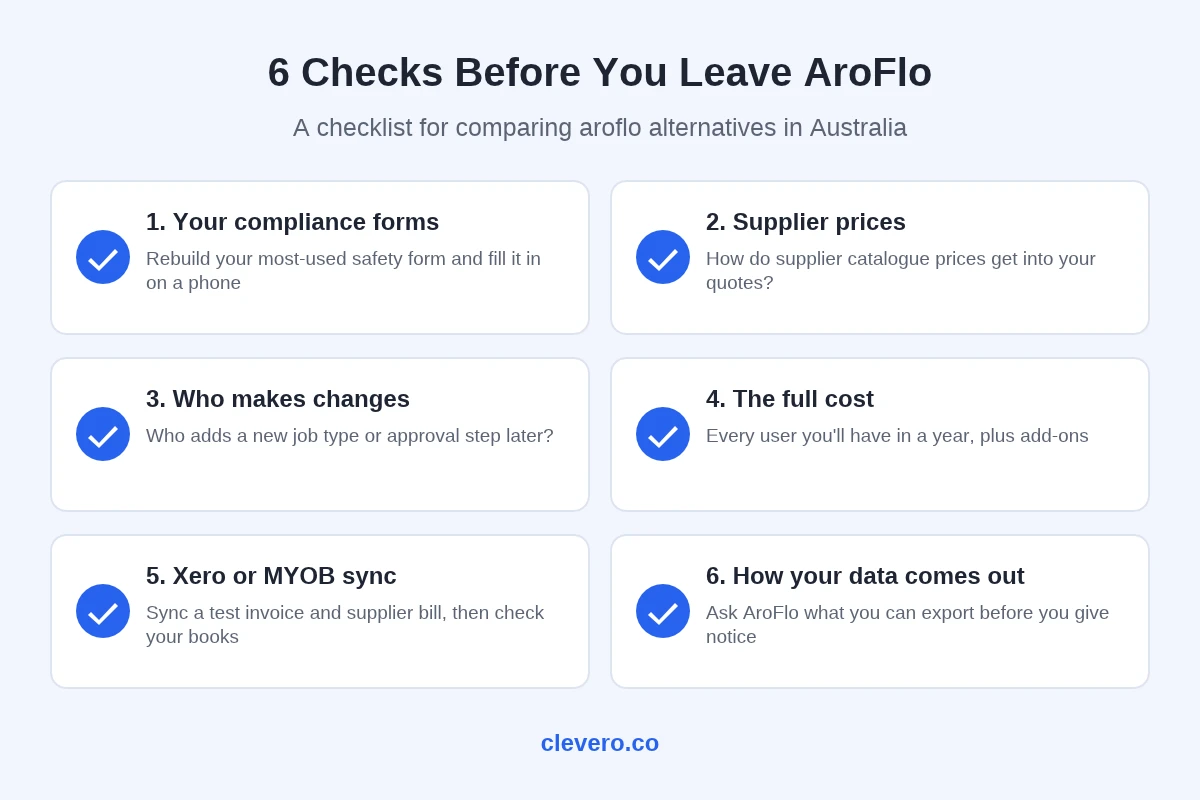
Before you book demos with any aroflo alternatives, pick one messy job from last month: one with a compliance form, supplier bills and a change after the quote. Then check each option against this:
- Rebuild your most-used compliance or safety form and fill it in on a phone.
- Check how supplier prices get into quotes, if you rely on AroFlo’s supplier catalogues now.
- Add an asset or site with its service history, if you do maintenance work.
- Price the plan for every office and field user you’ll have in a year, including add-ons.
- Sync a test invoice and supplier bill to Xero or MYOB and check what lands in your books.
- Ask who makes changes. When you add a job type or approval step, can you do it, or does it go to the vendor?
- Ask how long setup takes and what’s included, then give the app to your least technical field worker for a day.
- Ask AroFlo what you can export before you give notice, and keep it readable for the first month.
If Xero is the deciding factor, I’ve compared field service software with Xero integration in a separate post.
AroFlo vs Clevero: Which One Should You Choose
| AroFlo | Clevero | |
| Built around | Quotes, jobs, compliance, inventory and suppliers for trades | Jobs, clients, compliance records and workflows for service businesses |
| Pricing | From A$80 per user a month, minimum 3 users | Quote, based on what you use |
| Supplier catalogues | Built in, linked to Australian trade suppliers | Check in a demo |
| Changing workflows | Configurable forms and workflows | Point-and-click by your team, new job types and approval steps |
| Service lines | Trade and construction work | More than one service line, each with its own workflow |
| Accounting | Xero and MYOB | Native Xero and MYOB |
| Audit trail | Check with AroFlo | Built as your team works |
AroFlo is a strong fit for a trade business of three or more that orders a lot of stock and lives in compliance forms. Clevero is for when the job is only part of what you track, and you want clients, records and workflows in one place your team can change. If supplier catalogues are the centre of your day, stay with AroFlo or look at Ascora. If you’re adding service lines, office staff and client records, that’s the work Clevero is built for.
Read next: 7 Best Tradify Alternatives in Australia
So, Which Is Best Among the AroFlo Alternatives?
If you want something lighter and cheaper for a small crew, ServiceM8 or Tradify is the safe pick. Fergus fits teams that mainly need job costing, NextMinute fits builders with staged jobs, Ascora fits teams that want inventory at a lower rate, and Simpro fits businesses that have outgrown AroFlo.
If you need jobs, clients and compliance records in one system your team can change, I’d look at Clevero. Whichever aroflo alternatives you shortlist, ask each vendor to demo the same messy job from last month and see which one leaves your office with less to fix.

Read next: See all Clevero features
Frequently asked questions
1. What are the best aroflo alternatives in Australia?
The best aroflo alternatives in Australia are Clevero, Simpro, ServiceM8, Fergus, Tradify, NextMinute and Ascora. Clevero suits service businesses that need jobs, CRM and compliance records in one system they can change. ServiceM8 and Tradify suit small crews, Fergus suits teams focused on job costing, and Simpro suits larger businesses.
2. Why do businesses look for aroflo alternatives?
The most common reasons are fit and cost. AroFlo starts at three users, so very small teams pay for seats they don’t use, and some features such as GPS Tracking are add-ons. Independent reviews also say it takes time to set up. Businesses that use its compliance, inventory and supplier tools every day are usually happy with it.
3. AroFlo vs Simpro: which is better?
They’re part of the same group, the Simpro Group, but run as separate products. AroFlo suits Australian trade teams that rely on configurable forms, compliance and supplier-driven inventory. Simpro suits larger, multi-division businesses with complex projects. AroFlo publishes a starting price; Simpro quotes and charges a setup fee.
4. How much does AroFlo cost in Australia?
AroFlo starts at A$80 per user a month with a minimum of three users, and the per-user rate drops as you add users (AroFlo’s pricing page, November 2026). The page doesn’t say whether GST is included. GPS Tracking and the AI Bill Scanner are add-ons.
5. Is there software like AroFlo for small teams?
Yes. ServiceM8 is free for one user and 30 jobs a month, then priced by job volume with unlimited users. Tradify starts at A$48 per user a month ex GST. Both are simpler than AroFlo, with less depth for compliance and inventory.
6. Which AroFlo competitors handle inventory?
Simpro and Ascora both include inventory, and Ascora also covers equipment maintenance on a per-user plan. If you order a lot of stock through AroFlo’s supplier catalogues, ask each vendor to show how supplier prices reach your quotes.
7. How do I move my data out of AroFlo?
Ask AroFlo what you can export (clients, sites, assets, quotes, jobs, invoices and attachments) and ask your new vendor what it can import. Start with clients, sites and price lists, then move live jobs in a small batch. Keep AroFlo readable for the first month. Clevero’s data migration team can help with this step.