Moving job software means exporting your customers, rebuilding your quote templates and getting the crew to trust a new app, usually in the middle of a busy month, so you want to do it once. If you’re weighing up simpro vs servicem8, it helps to know where each one stops fitting before you move. I’ve compared the two on price, setup time, job costing and the mobile apps, and noted the size of business each one suits.
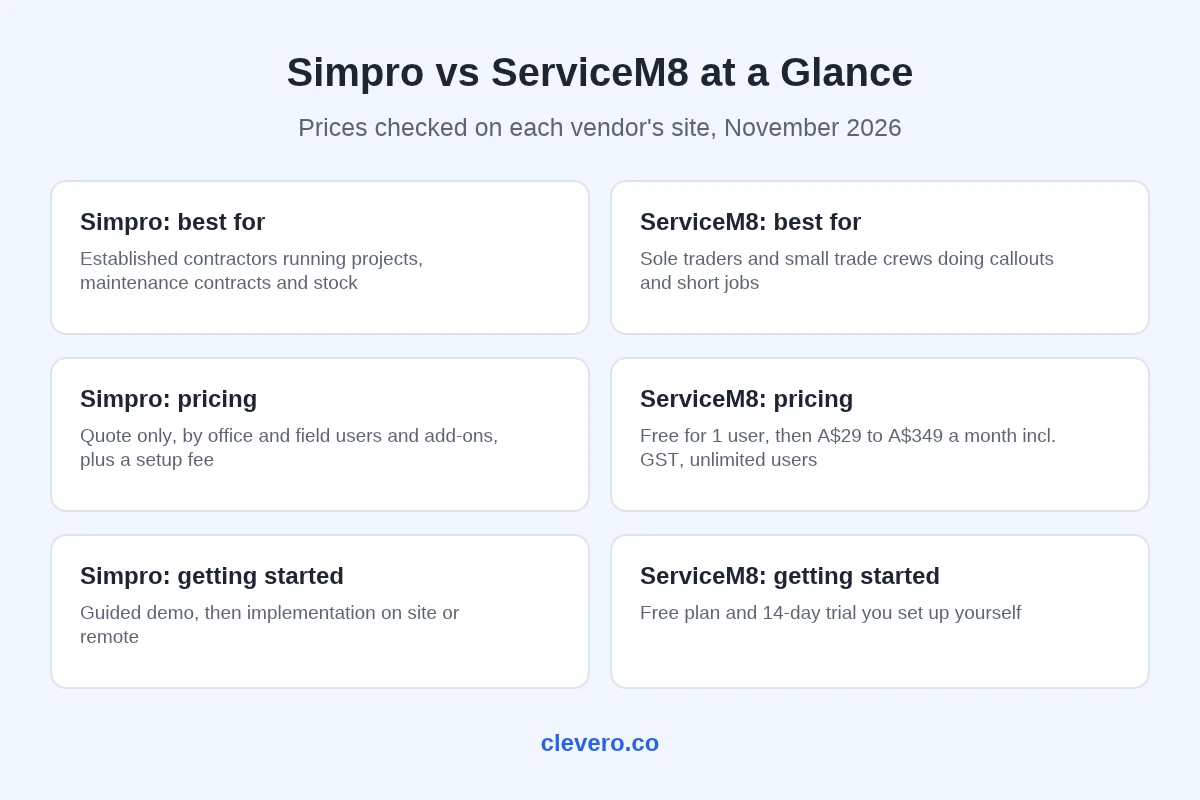
TL;DR for simpro vs servicem8: ServiceM8 suits sole traders and small trade crews. It publishes its prices (free for one user, then A$29 to A$349 a month including GST, with unlimited users on paid plans) and has a 14-day free trial. Simpro suits established contractors running projects, maintenance contracts and stock. It quotes, charges a setup fee and starts with a demo. Both are Australian and connect to Xero and MYOB. Clevero is a third option for service businesses that run more than one type of work and want to change their workflows themselves.
Simpro vs ServiceM8 at a Glance
Here is a quick simpro servicem8 comparison for those who are short on time:
| Simpro | ServiceM8 | Clevero | |
| Best for | Established trade contractors running projects, maintenance and stock | Sole traders and small trade crews | Service businesses running more than one type of work |
| How it’s priced | By office and field users, plus add-ons | By jobs a month, unlimited users | By what you use |
| Pricing (Nov 2026) | Quote only, plus a setup fee | Free for 1 user and 30 jobs, then A$29 to A$349 a month incl. GST | Quote only |
| Getting started | Guided demo, then implementation | Free plan and 14-day trial, self-serve | A call with our team, then we set it up with you |
| Project work | Multi-stage projects, estimating and takeoffs | Progress invoices and job costing on Growing and above | Projects and tasks in the same platform |
| Xero / MYOB | Both | Both | Both, native |
Quick pick:
If you’re a sole trader or a small crew doing callouts and short jobs → look at ServiceM8.
If you’re a contractor running multi-stage projects, maintenance contracts and stock → look at Simpro.
If you’re on ServiceM8 and your busy months already push you up a plan → compare both before you move.
If your business runs trade jobs alongside other services, such as bookings or recurring client work → look at Clevero.

Why trade businesses compare Simpro and ServiceM8
The two come up together because they’re both Australian, both connect to Xero and MYOB, and they sit at opposite ends of the market. These are the differences that usually decide it:
- They’re priced in opposite ways. ServiceM8 charges by jobs a month and every paid plan has unlimited users. Simpro prices by the number of office and field users and the add-ons you take, plus a setup fee for onboarding, training and data migration (both vendors’ sites, November 2026).
- Getting started is very different. ServiceM8 has a free plan and a 14-day trial you run yourself. Simpro has no self-serve trial and starts with a guided demo from a local consultant.
- Bigger work needs more structure. Simpro is built for estimating, takeoffs, inventory and maintenance planning. ServiceM8 adds job costing, asset management and progress invoices from its Growing plan.
- Recent reviews point in different directions. On the Xero App Store, ServiceM8’s recent reviews (September to November 2026) talk about ease of use and time saved. Simpro’s recent ones (February to July 2026) describe the software as capable but raise support response times, contract terms and setup cost.
Simpro
Best for: established trade and service contractors running projects, maintenance contracts and stock.
Price: quote only, plus a setup fee (checked in November 2026).
Watch out for: the contract term. Recent reviewers raise a 12-month minimum term and notice periods, so read both before you sign.
Simpro started in Australia and says it has been in field service for more than 20 years, with over 9,000 businesses using it. It covers estimating, digital takeoffs, scheduling, job costing, inventory, maintenance planning and invoicing. Add-ons include Simtrac for fleet tracking, Data Feed (which reads emails and attachments and creates jobs and quotes from them), digital forms and SMS. You’ll find it in electrical, plumbing, HVAC, fire protection and security businesses, often ones that mix service calls with longer project work.
Simpro pricing is tailored to how many people you have in the office and in the field and which add-ons you need, billed monthly or annually. There’s no self-serve trial: you book a demo with a local consultant, and implementation can happen on site or remotely. Support runs 24 hours a day, six days a week across Australia and New Zealand. Some recent reviewers had trouble getting supplier invoices to sync with Xero, so ask to see your own invoice flow in the demo. If Simpro feels like more than you need, see my list of Simpro alternatives.
Pros
- Handles service, project and maintenance work in one system
- Estimating, takeoffs and inventory built in
- Connects to Xero, MYOB, QuickBooks and Sage
- Local support 24 hours a day, six days a week
- Multi-company management for businesses with more than one entity
Cons
- No published prices, and a setup fee on top
- No self-serve trial
- Recent reviews raise support response times and contract terms
- Takes time to learn; one long-term reviewer titled their review “4 years and still learning”
ServiceM8
Best for: sole traders and small trade crews doing callouts and short jobs.
Price: free for 1 user and 30 jobs a month, then A$29 to A$349 a month incl. GST, with unlimited users (checked in November 2026).
Watch out for: the job cap on each plan. Starter covers 50 jobs a month, Growing 150 and Premium 500, so count your jobs in a busy month before you pick.
ServiceM8 is an Australian job management app built around the phone. Staff create and schedule jobs, quote, invoice and take card payments from the iOS and Android apps, and ServiceM8 says its Android app is almost identical to the iOS one. Recent reviewers on the Xero App Store say it’s easy to use, saves them hours each week and sends invoices straight to Xero. One asked for more features in the iPhone app.
ServiceM8 pricing in Australia is set by jobs a month, and every paid plan includes unlimited users. The Growing plan (A$79 a month) adds job costing, recurring jobs, deposits, progress invoices, asset management, forms and certificates, and proposals. Card fees fall as you move up, from 1.69% + 30c on Starter to 1.19% + 30c on Premium Plus. It connects to Xero, MYOB and QuickBooks Online. If you’re starting to find its limits, see my list of ServiceM8 alternatives.
Pros
- Prices on the website, with a free plan and a 14-day trial
- Unlimited users on every paid plan
- Quick to start without an implementation project
- Job costing, progress invoices and asset management on Growing and above
- iOS and Android apps
Cons
- Plans are capped by jobs a month, so a busy month can push you up a plan
- Built around individual jobs, so long multi-stage projects take more work to track
- Some users want more features in the mobile app
Read next: 6 Best Field Service Management Software in Australia (2026)
Simpro vs ServiceM8 on the details that matter
Pricing
Say you run a team of 10 with about 120 jobs a month. On ServiceM8 that’s the Growing plan at A$79 a month including GST: users are unlimited and 150 jobs covers you, with card fees of 1.49% + 30c on payments taken through it. If a busy month goes past 150 jobs, Premium is A$149.
On Simpro you’d get a quote based on your office and field users and the add-ons you need, plus a one-off setup fee that covers onboarding, training and data migration. Ask for the quote and the setup fee in writing before the demo, so you can compare them with the ServiceM8 figure for the same team.
Setup and onboarding
You set ServiceM8 up yourself. You sign up, add your team and start on the free plan or the 14-day trial, which suits a small business without an office manager to run a software project.
Simpro sets itself up with you. An implementation consultant works through your quote templates, stock, accounts and data, either at your office or remotely. It takes longer and costs more, and the consultant shapes the workflows around how your business runs.
Project work and job costing
This is where the servicem8 vs simpro choice usually gets decided. Simpro is built for multi-stage projects: estimating, digital takeoffs from plans, inventory, and job costing across a long job. ServiceM8 has job costing, progress invoices and markup billing from the Growing plan, which covers a lot of small and medium jobs. If your work is mostly callouts and jobs that finish in a day or two, ServiceM8 is enough. If it’s fit-outs, maintenance contracts and projects with stages and variations, Simpro fits better.
Mobile apps
Both have iOS and Android apps for field staff. ServiceM8’s app is the core of the product, and its reviewers often call it easy to use. Simpro’s field app gives staff their schedules and job histories from the same records the office uses. Whichever you trial, give the app to the tech who likes new software least and see how they go.
Xero and MYOB
Both connect to Xero and MYOB, and both also connect to QuickBooks. On ServiceM8 you connect the accounts yourself; on Simpro the implementation consultant sets it up. Recent ServiceM8 reviewers like invoices going straight to Xero, while some Simpro reviewers had problems with supplier invoices. Test the sync with your own bills before you commit. I’ve written more about this in field service software with Xero integration.
Where Clevero fits as a third option
Best for: service businesses that run trade jobs alongside other kinds of work and want to change their workflows themselves.
Price: quote only, based on what you use (checked in November 2026).
Watch out for: Clevero isn’t a trade-specific app. If you only need quotes, jobs and invoices from a phone, ServiceM8 is simpler.
Some businesses comparing simpro vs servicem8 run more than trade jobs: a maintenance team next to a consulting arm, or field work next to client bookings and recurring service contracts. Clevero is an Australian business management platform where scheduling, jobs, CRM, quoting, digital forms, e-signatures, workflow automation and billing sit in one system. Each service line can have its own workflow in the same platform.
The difference I’d point to is who makes changes. Adding a field, a new job type or an approval step is point-and-click, and our team sets it up with you, so you don’t wait on a consultant every time the way you work changes. The audit trail builds as your team works, so you can see who changed a job, a form or an invoice, and when.
Clevero has native Xero and MYOB integrations, so invoices and payments reach your accounts without re-keying. If you’re moving from another system, our data migration assistance brings your records across. You can see the full list of Clevero features on our site.
Pros
- Workflows, fields and forms you can change yourself, point-and-click
- More than one service line in the same system
- Native Xero and MYOB integrations
- Audit trail built as your team works
Cons
- No public price list; you get a quote
- Not built as a trade-only app, so a small crew that just needs job cards will find ServiceM8 quicker to start
How to choose between Simpro and ServiceM8
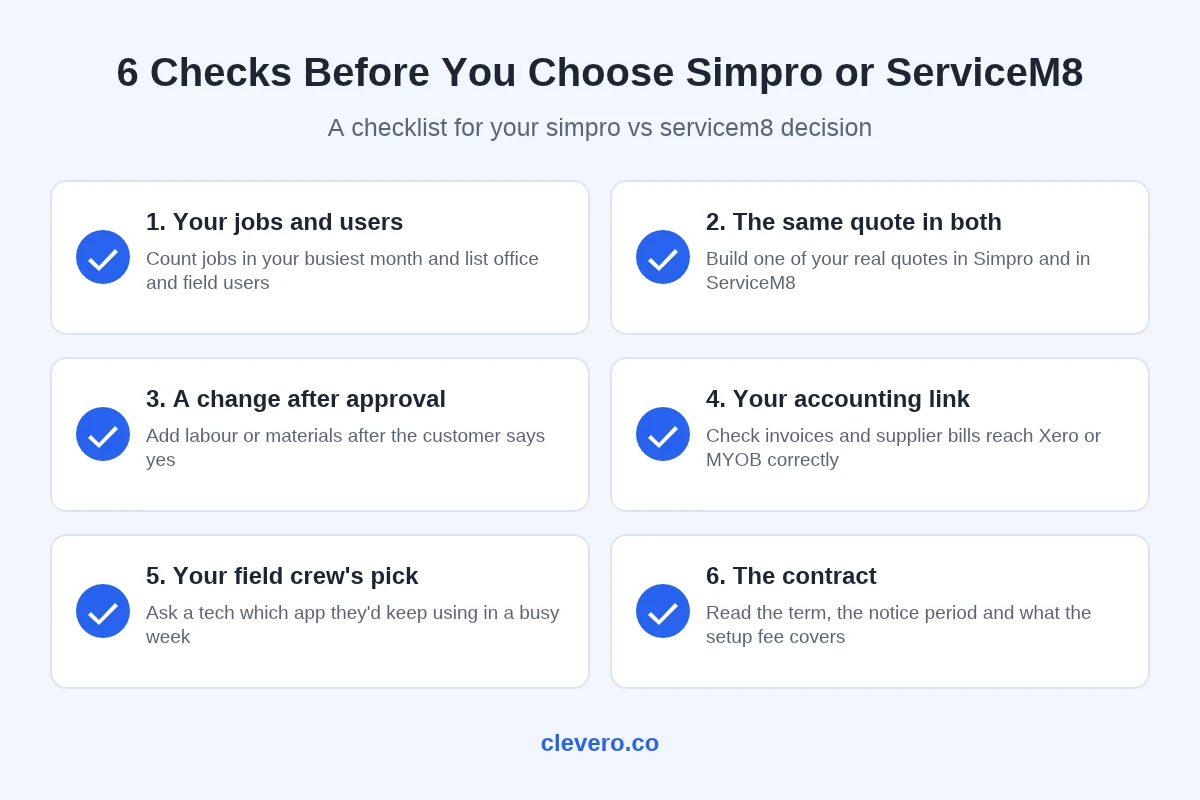
The quickest way to settle simpro or servicem8 is to run the same small test in both, with your own numbers:
- Count your jobs in the busiest month of the past year, which tells you which ServiceM8 plan you’d sit on, and list your office and field users and add-ons before you ask Simpro for a quote.
- Build the same quote in both, using one of your real jobs.
- Add a labour or materials change after the customer approves, and see how each one handles it.
- Raise the invoice and check it reaches Xero or MYOB with the right tax codes, along with a supplier bill.
- Ask a field tech which app they’d keep using in a busy week.
- Read the contract term, the notice period and what the setup fee covers before you sign anything.
Read next: 7 Best ServiceM8 Alternatives in Australia for 2026
Simpro or ServiceM8: Which One Fits Your Trade Business?
ServiceM8 fits sole traders and small crews who want to start this week, see the price up front and run the system themselves. Simpro fits established contractors with projects, maintenance contracts and stock, who are ready for a demo, a setup fee and an implementation project.
If you sit between the two, look at the work more than the headcount. Mostly callouts and short jobs point to ServiceM8, even for a bigger team, because users are unlimited. Multi-stage projects, variations and stock point to Simpro. And if your trade work sits next to other services you need to run in the same system, add Clevero to the shortlist.
Whichever way your simpro vs servicem8 decision goes, run one real job through it before you move your customers across.

Read next: 5 Best Simpro Alternatives in Australia for 2026
Frequently asked questions
1. Is Simpro better than ServiceM8?
In the simpro vs servicem8 comparison, neither is better for everyone. Simpro is the stronger fit for established contractors running projects, maintenance contracts and stock. ServiceM8 is the better fit for sole traders and small crews doing callouts and short jobs, with published prices and unlimited users on paid plans.
2. Why do trade businesses compare simpro vs servicem8?
Both are Australian, both connect to Xero and MYOB, and they’re priced in opposite ways. The comparison often comes up when a business has outgrown a simple app, or when it’s choosing a first system and wants to know whether it needs the bigger platform.
3. Is Simpro overkill for a small team?
Often, yes. A small team doing callouts will pay a setup fee and go through an implementation for features it may not use. A small team with maintenance contracts, assets or project work may still find Simpro worth it.
4. How much does ServiceM8 cost in Australia?
As of November 2026, ServiceM8 is free for one user and 30 jobs a month. Paid plans are A$29 (50 jobs), A$79 (150 jobs), A$149 (500 jobs) and A$349 (1,500+ jobs) a month, including GST, with unlimited users. Card fees are extra.
5. How much does Simpro cost?
Simpro doesn’t publish prices. It quotes based on your office and field users and the add-ons you need, billed monthly or annually, and charges a setup fee for onboarding, training and data migration.
6. Can you move from ServiceM8 to Simpro?
Yes. Simpro’s setup fee covers data migration, so ask what it will bring across from ServiceM8, such as customers, open jobs and job history, and how long the move takes.
7. Do Simpro and ServiceM8 work with Xero and MYOB?
Yes, both connect to Xero and MYOB, and to QuickBooks. Test the sync with your own invoices and supplier bills during the trial or demo.